Some software begins with an ambitious plan. Other software begins with a minor inconvenience that refuses to go away.
Tack belongs to the second category.
I spend much of my working day moving between engineering models, coordination drawings, emails, documents and development environments. Each application has its own purpose, but the work connecting them rarely happens in one place.
A question needs following up. A drawing needs checking. Someone is waiting for an answer. An idea appears in the middle of something unrelated.
None of these warrants opening a project management platform, creating a workspace or navigating several menus just to record a thought.
Sometimes, I simply need a task to remain in sight.
That was the starting point for Tack.
The Idea Was Deliberately Small
The original concept was straightforward: a lightweight desktop utility that could sit quietly on the screen, stay within reach, and make capturing a task almost effortless.
I didn’t want another application demanding attention. I wanted something that respected it.
The interface took the form of a small floating orb, 40 pixels across, always on top of whatever else is open. It never takes focus from the application you’re in. Click it, or press Ctrl+Alt+Space from anywhere, and your tasks appear. Type one, press Enter, press Esc, and you’re back at work. Drag the orb and it follows; leave it near the edge of the screen and it snaps there, and the panel adapts to the space it has.
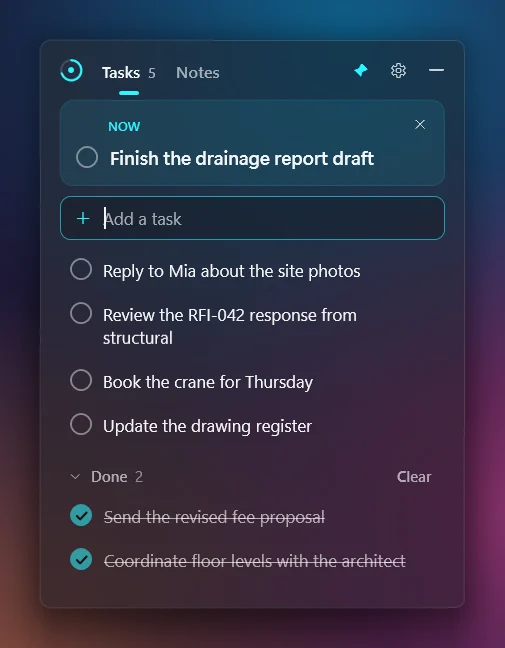
There are no tags, priorities or due dates. One task can be marked Now, and hovering over the orb shows you that task without opening anything. The ring around the orb is today’s progress: what’s finished out of what’s left. There is no streak to protect and no statistics screen. Each morning it starts empty.
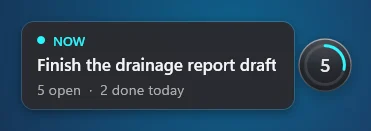
These might sound like insignificant details, but they became an important part of the experience.
Software should accommodate the way people work, rather than constantly asking people to accommodate the software.
From a Task List to a Workflow Companion
As Tack developed, the original idea started revealing opportunities I hadn’t considered.
Why describe a file when I could drag it straight onto Tack?
Why copy an email’s subject and paste its link into a task when the application could keep that connection for me?
Why should something I remember while lying in bed have to wait until I’m back at my computer?
These questions gradually shaped the application.
On Windows, the orb is now also the quickest place to put something you’ve just seen. Drag an email from Outlook, a clash report from Explorer, a link from the browser or a few lines of text onto it, and each becomes a task, up to twenty at a time, without leaving the application you’re in. The task takes a sensible name: the file’s name, the email’s subject, the page’s title. A small paperclip on the task opens what you dropped, and an Undo sits beside the orb in case you dropped the wrong thing.
The goal was never to add complexity. It was to remove small interruptions.
Small Features, Kept Out of the Way
Everything added since has had to follow one rule: if you don’t want it, you shouldn’t be able to tell it’s there.
Notes are sheets of scrap paper. They save as you type, show their Markdown formatted while you read, and turn any line into a task with Ctrl+Enter. Paste a screenshot of some instructions, keep it on the sheet while you follow it, then throw it away.
Search (Ctrl+F) finds every task, finished task and note as you type, and takes you straight to the one you picked.
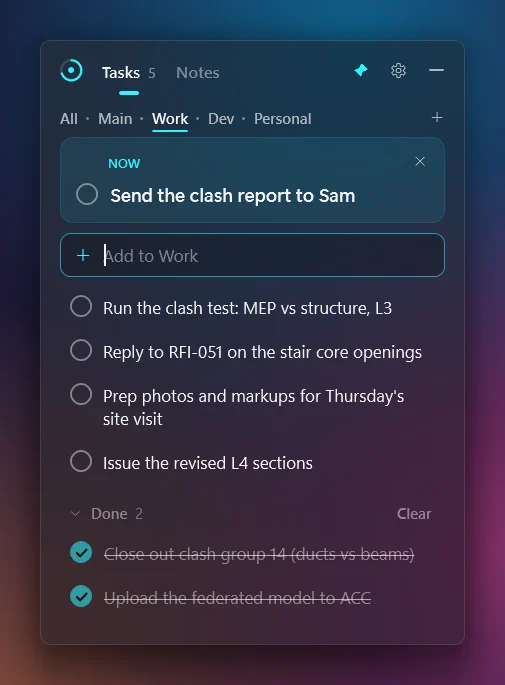
Spaces keep work, development and personal tasks apart, one keystroke from each other. Until you make a second space, Tack looks exactly as it would without them.
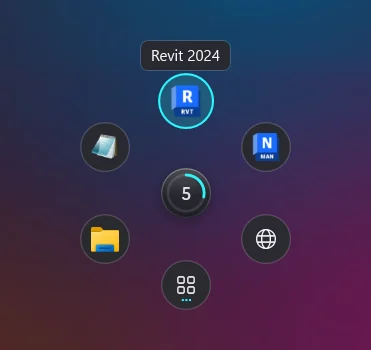
The launcher is the feature I built for my own desk. Shift+click the orb and six shortcuts fan out around it: applications, folders, websites. Rest on an application and the files it opened last appear beside it, including Revit’s, AutoCAD’s and Navisworks’ own recent lists. Anyone who keeps several versions of Revit installed will understand why this matters: a Revit 2024 model opens in Revit 2024, even when .rvt files are set to open in another version. It’s off by default, and while it’s off nothing changes.
Tack also knows when to leave. It steps aside while a full-screen video, game or slideshow is in front, and comes back afterwards. On Windows it needs no installation, and folded away it uses almost nothing: no timers, no polling, 0% of the processor while idle, and a few megabytes of memory.
Your Tasks, on Your Own Storage
The question about lying in bed took longer to answer, because the obvious answer was the one I wanted to avoid. An account, a server and a database would have worked. They would also have meant holding other people’s tasks, and asking them to trust me with their working days.
Tack Focus, at tackfocus.app, is the same tasks, notes and spaces as a web application for your phone or any browser. Add it to your home screen and it behaves like an app. It works offline, and on Android you can share a page or a link to it from any other app. The task box sits under your thumb, and finishing the last task of the day earns one soft bloom of light, not a streak.
The two keep in step through your own OneDrive or Google Drive. There is no Tack account, and no Tack server holding your data. Each device writes its own file to a folder in your drive and reads the others, so a thought captured on the phone at night is waiting on the PC in the morning. Tack for Windows never connects to anything itself: your drive’s desktop app carries the files. Both also work perfectly well without sync. On Windows, everything sits in one readable file on your own machine.
Those files aren’t end-to-end encrypted yet, so your tasks are as private as your own drive is. What a task points to, such as a file path or a saved email, never leaves the PC at all; your phone sees only the task’s text.
Building Software Differently
Tack is also part of a much larger personal experiment.
My professional background is in systems integration and engineering coordination, not traditional software development. For years, I could identify workflow problems and imagine solutions, but building those solutions required resources and expertise that weren’t always accessible.
AI-assisted development has changed that equation considerably.
It has allowed me to move from describing a problem to testing a working solution in remarkably short periods of time. The first version of Tack was released on 14 October. Version 1.11, the fourteenth release, came out on 2 November.
That doesn’t mean the process is automatic, or that every generated solution is correct. Decisions about behaviour, architecture, reliability and user experience still matter. So do testing, reviewing changes and understanding what the software is actually doing. Most of what makes Tack feel like Tack is a decision somebody had to make: an orb that can never sink behind a window, Undo instead of “Are you sure?”, no server to hold your data. That somebody still has to be a person who cares about the outcome.
But the distance between an idea and a functioning prototype has become much shorter.
Instead of accepting an inconvenience because developing an alternative would take too much time, I can experiment.
Sometimes the experiment fails. Sometimes it leads somewhere unexpected. And occasionally, a small idea becomes something I find myself using every day.
Why Tack Is Free
I want Tack to remain free. No ads, no accounts, no telemetry, no paid tier.
There is no elaborate business model behind that decision.
I built it because I needed it, and I believe other people might find it useful too. The code is open under the MIT licence, so nobody has to take my word for what it does.
Not every piece of software needs to become a subscription, and not every personal project needs to justify its existence through revenue.
There is value in building something useful, sharing it, and improving it through experience.
Tack is also an opportunity for me to learn: about desktop applications, web development, synchronisation, interface design, and maintaining software that other people depend on.
Those lessons have value of their own.
What Comes Next
Tack is still young.
There are improvements to make, behaviours to refine, and ideas that may or may not belong in the application. I’m particularly interested in keeping the experience consistent across desktop and phone without losing what makes each platform useful.
But I’m not interested in turning Tack into an oversized productivity suite.
Its purpose remains simple: make it easier to capture what matters, keep it in sight, and return to the work that needs doing.
I’ll use this journal to document its development, including the decisions, experiments, mistakes and occasional surprises along the way.
If you’d like to try it, Tack for Windows is a free download from GitHub, for Windows 10 and 11. It isn’t code-signed yet, so Windows may warn you the first time you run it. Tack Focus needs no download at tackfocus.app. All of it is developed in the open at github.com/Exo-dread/tack.
You may have noticed the orb beside this article. It’s a small copy of Tack, and these sections have been its tasks. Click it to see your list.
It’s a small piece of software.
And sometimes, that’s exactly what you need.